
Monthly budget vs actual review with engineering leads
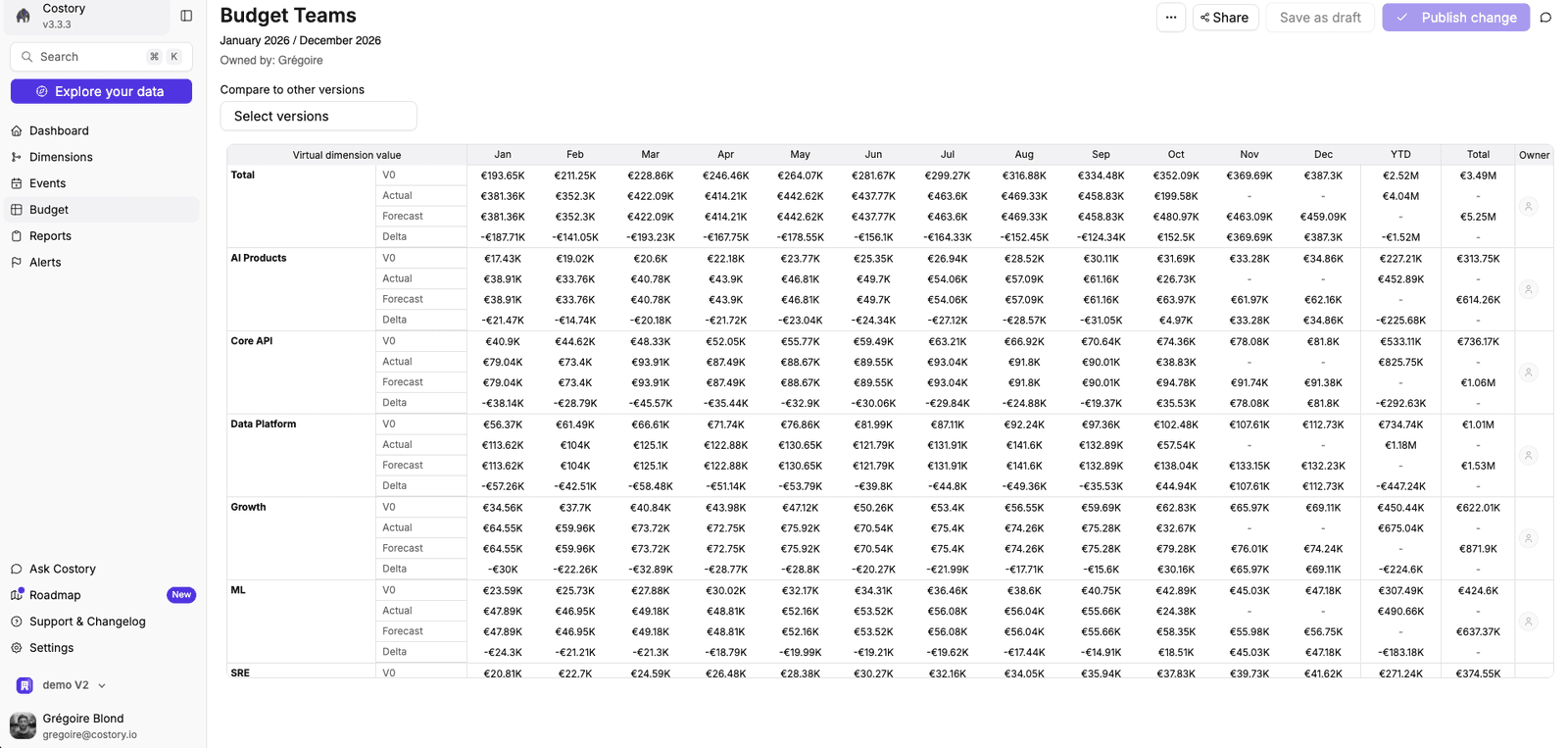
A ready-made dashboard and monthly report with target, actual, forecast and delta per team, for the VP Infrastructure review.
Runs in
Claude · Dashboard · Email
First optimization recommendation
The next day
ROI
Pays for itself with the first recommendation you act on
Playbook
What the agent does
From what Costory notices to what you decide. Costory suggests the next step in conversation, and you decide whether to go ahead.
Costory notices
The 3rd of every month.
Costory investigates
01
Budget table
Target, actual, forecast and delta per line, plotted next to cost.
02
Monthly report
Scheduled to the review channel or inbox.
03
Claude prepares
A summary of the top variances and their drivers.
04
Decide
Owners commit to actions in the meeting.
Where you see it
Claude
You decide
Engineering leads commit to actions on the top variances.
Why it matters
Monthly budget reviews take a day of preparation and end up discussing data quality instead of decisions.
Who it’s for
VP Infrastructure, engineering leads, finance
Where it runs
Claude · Dashboard · Email
What you get
What lands in front of your team
Prep in minutes
Variances explained before the meeting.
Owners named
Every line has someone accountable.
A consistent format
The same view every month.
Sources and assistants
What it connects
Data sources
Example prompts
Or drive it yourself
Prepare
Prepare the budget vs actual review for September: top 5 variances with drivers and owners.
Report
Schedule the budget vs actual dashboard as a PDF to the engineering leads list on the 3rd of each month.
FAQ
Questions about this playbook
How are forecasts generated?
Costory forecasts end-of-month values for each budget line with TimesFM by Google, and alerts can use actual or forecasted thresholds.
How long does this playbook take to set up?
Connecting your billing data and the Costory MCP takes under 30 minutes with Terraform or CloudFormation. The playbook itself takes minutes: pick the scope, the trigger and the Slack channel. The first billing data lands the next day, and the agent starts from there.
Can we adjust what the agent does?
Yes. You choose the trigger, the scope (team, service, environment), the channel and the format, and you can pause or change it at any time.
Does Costory change anything in our cloud accounts?
No. Costory reads billing exports and the metrics you connect, and has no write access to your cloud. Actions it takes create Costory objects only: alerts, reports, dashboards and events. Your team stays in control of every change.
Step-by-step guide in the Costory docs
Related playbooks
Run these alongside it
Costory notices
A team's forecast crosses a budget threshold.
Team budgets with forecast-based alerts
Monthly budgets per team, with Slack or email alerts when actual spend or the end-of-month forecast crosses a threshold.
See the playbook
Costory notices
The forecast for a team moves materially.
End-of-month cost forecast per team, before the invoice
See where each team will land at month end, based on a forecast model, and investigate drifts while there's still time.
See the playbook
Costory notices
The 11th of every month.
Automate the monthly cloud cost review
A monthly report with an executive summary, root causes and trends, generated from a Cost digest and delivered automatically.
See the playbook

Put this playbook on call
Included in every plan, from €250/month. 30-day free trial: connect in under 30 minutes, get your first optimization recommendation the next day.
First optimization recommendation
The next day
ROI
Pays for itself with the first recommendation you act on
Setup
About 30 minutes
Data residency
EU
Access
Read-only on your cloud